Buy schleswig.info ?
We are moving the project
schleswig.info .
Are you interested in purchasing the domain
schleswig.info ?
domain@kv-gmbh.de · 0541-91531010
Buy schleswig.info ?
How do I disable history in Opera?
To disable history in Opera, you can go to the browser's settings by clicking on the Opera menu button in the top left corner and selecting "Settings." Then, navigate to the "Privacy & security" section and find the "History" option. You can disable history by toggling off the switch next to "Remember browsing history." This will prevent Opera from saving your browsing history. **
How can you restore the browsing history in Opera?
To restore the browsing history in Opera, you can follow these steps: 1. Open the Opera browser and click on the Opera menu button in the top-left corner of the window. 2. Select "History" from the menu to open the browsing history. 3. In the history tab, you can search for specific websites or dates to find the browsing history you want to restore. 4. Once you have found the browsing history you want to restore, you can click on the website or page to open it again. Alternatively, you can also use the keyboard shortcut Ctrl+H to open the browsing history directly. **

Similar search terms for Opera
Top-Angebote
Products related to Opera:
-
Showerdrape Opera White/Chrome Freestanding Spare Toilet Roll HolderEnhance your bathroom with the Showerdrape Opera White/Chrome Freestanding Spare Toilet Roll Holder, a perfect blend of elegance and functionality. Made from chrome-plated steel with rounded edges and a sleek matt white finish, this freestanding spare toilet roll holder accommodates up to three spare toilet rolls. Part of the Opera collection, it offers a timeless style that complements various bathroom designs. Dimensions: 44 (H) x 16 (W) x 16 (D) cm. Weight: 1.65kg.30,00 £*Shipping: 3,50 £Secure redirect to the provider
-
DeLonghi Specialista Opera Bean to Cup Manual Coffee Machine Kit Silver 0.2LEnjoy high-end, speciality coffee and a true café experience at home with La Specialista Opera. Its smart features streamline the coffee making process, while preserving the authentic coffee-making experience, making honing your craft as a barista that little bit easier. From dynamic pre-infusion technology to five preset coffee recipes (espresso, double espresso, Americano, cold brew and espresso cool), every feature of La Specialista Opera is designed to elevate your coffee and milk preparation at home. Whether you're getting the best out of your beans or experimenting with milk creations, La Specialista Opera makes crafting perfect coffee effortless. Brand Name: De'Longhi.799,99 £*Shipping: 0,00 £Secure redirect to the provider
-
From the Archives: Black History and Culture Value PackThis brand-new series is rooted in a profound commitment to shedding light on some of the important -- and often lesser-known -- aspects of Black history. From the Archives features landmarks, events, people, and artistic endeavors that have played...27,99 $*Shipping: 0,00 $Secure redirect to the provider
-
Teixcalaan Book 2: A Desolation Called Peace by Arkady Martine - Fiction - Space OperaTitle:. A Desolation Called Peace (Teixcalaan Book 2) Overview:. A Desolation Called Peace is Arkady Martine’s dazzling sequel to A Memory Called Empire, continuing the high-stakes space opera that blends political intrigue with multilingual worldbuilding. Set against the sprawling Teixcalaanli Empire, the story throws fleet captain Nine Hibiscus into a crucible of diplomacy and defiance as an alien threat presses at the empire’s borders. Diplomacy, not brute force, becomes the weapon of choice as Mahit Dzmare and Three Seagrass—each bearing the weight of memory, culture, and loyalty—navigate a tense, alien communications challenge. The core dilemma is stark: even if a dialogue with the invaders is possible, missteps could trigger a catastrophe that would reshape Teixcalaan forever. This is a novel that rewards close attention to language, etiquette, and ritual as strategies for survival, while delivering big-screen-scale action and intimate character moments. Martine’s deft layering of imperial politics, first-contact tension, and a deeply humane gaze at what it means to belong makes A Desolation Called Peace a must-read for fans of thoughtful science fiction that never sacrifices excitement for intellect. What Makes This Book Stand Out:. What sets A Desolation Called Peace apart is its fearless blend of political acumen with visceral, character-driven storytelling. Martine builds a living empire where the power of a nation is reinforced by poetry, etiquette, and memory—the Teixcalaanli habit of encoding meaning in names and rituals becomes a tactical language for both diplomacy and warfare. The alien encounter presses on the most human pressure points: trust, memory, and the fear of annihilation. The novel’s pacing shifts between tense negotiations and large-scale conflict, delivering cinéma-grade battle sequences without sacrificing the nuance of cultural exchange. It’s a cerebral page-turner that rewards rereading, inviting readers to notice new linguistic and cultural threads with each pass. For readers who loved the intricate worldbuilding of its predecessor, this book expands the map without diluting the intimate stakes that keep you turning pages late into the night. Who This Book Is Perfect For:. This book is ideal for readers who crave sophisticated space opera with a literary edge. It appeals to fans of epic empire-building, complex geopolitics, and first-contact drama, as well as those who relish dense world-building where language shapes power. It’s well suited for adults and mature YA readers who enjoy The Expanse, Kim Stanley Robinson’s sociopolitical sf, or Ann Leckie-style planetary diplomacy, all filtered through Martine’s distinctive Byzantium-meets-Aztec sensibility. Gift buyers seeking a thought-provoking, high-drama sf experience will also find it a standout pick for collectors and long-time fans following the Teixcalaan saga. Key Highlights:. Second book in the acclaimed Teixcalaan duology, blending diplomacy and...99,99 £*Shipping: 0,00 £Secure redirect to the provider




-
How do I disable the browsing history in Opera?
To disable browsing history in Opera, you can follow these steps: 1. Open the Opera browser and click on the Menu button (three horizontal lines) in the top left corner. 2. Select "Settings" from the menu options. 3. In the Settings menu, scroll down to find the "Privacy & security" section. 4. Under the Privacy & security section, toggle off the option for "Remember browsing history" to disable browsing history in Opera. By following these steps, you can effectively disable browsing history in Opera and enhance your privacy while using the browser. **
-
What is the difference between Opera and Opera GX?
Opera GX is a specialized version of the Opera web browser designed specifically for gamers. It includes features such as a gaming-inspired design, a GX control panel for limiting CPU and RAM usage, and integration with gaming-related services. In contrast, Opera is a more general-purpose web browser with a focus on speed, security, and privacy. While both browsers share many of the same core features, Opera GX is tailored to the needs and preferences of gamers. **
-
How can you prevent Opera from saving your browsing history?
To prevent Opera from saving your browsing history, you can use the private browsing mode. In Opera, this is called the "Private Window" mode. When you open a new private window, Opera will not save your browsing history, cookies, or site data. You can also set Opera to clear your browsing history automatically by going to the settings and selecting the option to clear browsing data on exit. Additionally, you can use browser extensions or add-ons that offer additional privacy features to further enhance your browsing privacy in Opera. **
-
How can one prevent Opera from saving the browsing history?
To prevent Opera from saving the browsing history, you can go to the browser's settings and navigate to the Privacy & Security section. From there, you can enable the option to "Never remember history" or "Use private browsing mode." This will ensure that Opera does not save any browsing history while you are using the browser. Additionally, you can use the keyboard shortcut Ctrl+Shift+N to open a new private browsing window, which will also prevent the browser from saving your browsing history. **


Who knows this opera?
Opera enthusiasts, music historians, and fans of classical music are likely to know this opera. Additionally, performers, conductors, and composers within the opera world would also be familiar with it. Furthermore, those who have studied or have an interest in Italian opera may also be familiar with this particular work. **
How good is Opera?
Opera is a highly regarded web browser known for its speed, security features, and customization options. It has a built-in ad blocker, VPN, and battery saver, making it a popular choice for users looking for a fast and secure browsing experience. Additionally, Opera's user interface is sleek and user-friendly, making it a strong competitor in the web browser market. Overall, Opera is considered to be a very good web browser with a range of features that cater to the needs of modern internet users. **
Top-Angebote
Products related to Opera:
-
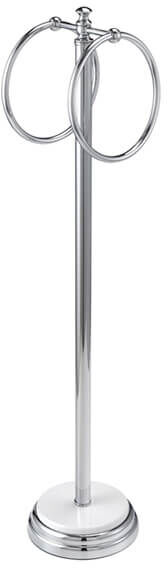
Showerdrape Opera White/Chrome Freestanding Double Towel RingAdd both style and practicality to your bathroom with the Showerdrape Opera White/Chrome Freestanding Double Towel Ring. Featuring a sleek combination of polished chrome and a white base, this towel ring exudes elegance while offering two convenient rings for efficient towel storage. Keep your bath or hand towels organised and easily accessible with this functional and stylish bathroom accessory. Part of the Opera collection, it offers a timeless style that complements various bathroom designs. Dimensions: 75.5 (H) x 16.5 (W) x 16.5 (D) cm. Weight: 1.85kg.57,00 £*Shipping: 0,00 £Secure redirect to the provider
-
Karl Lagerfeld Vienna Opera Eau de Toilette 100mLAn eau de toilette. What is the story of This product?. Step into a symphony of scent with this aromatic fougère fragrance, a tribute to the city of artists and its legendary opera. Created by Aliénor Massenet of Symrise, this perfume captures the drama and elegance of crowded cafés and velvet curtains rising.34,31 £*Shipping: 6,86 £Secure redirect to the provider
-
Showerdrape Opera White/Chrome Freestanding Spare Toilet Roll HolderEnhance your bathroom with the Showerdrape Opera White/Chrome Freestanding Spare Toilet Roll Holder, a perfect blend of elegance and functionality. Made from chrome-plated steel with rounded edges and a sleek matt white finish, this freestanding spare toilet roll holder accommodates up to three spare toilet rolls. Part of the Opera collection, it offers a timeless style that complements various bathroom designs. Dimensions: 44 (H) x 16 (W) x 16 (D) cm. Weight: 1.65kg.30,00 £*Shipping: 3,50 £Secure redirect to the provider
-
DeLonghi Specialista Opera Bean to Cup Manual Coffee Machine Kit Silver 0.2LEnjoy high-end, speciality coffee and a true café experience at home with La Specialista Opera. Its smart features streamline the coffee making process, while preserving the authentic coffee-making experience, making honing your craft as a barista that little bit easier. From dynamic pre-infusion technology to five preset coffee recipes (espresso, double espresso, Americano, cold brew and espresso cool), every feature of La Specialista Opera is designed to elevate your coffee and milk preparation at home. Whether you're getting the best out of your beans or experimenting with milk creations, La Specialista Opera makes crafting perfect coffee effortless. Brand Name: De'Longhi.799,99 £*Shipping: 0,00 £Secure redirect to the provider
-
How do I disable history in Opera?
To disable history in Opera, you can go to the browser's settings by clicking on the Opera menu button in the top left corner and selecting "Settings." Then, navigate to the "Privacy & security" section and find the "History" option. You can disable history by toggling off the switch next to "Remember browsing history." This will prevent Opera from saving your browsing history. **
-
How can you restore the browsing history in Opera?
To restore the browsing history in Opera, you can follow these steps: 1. Open the Opera browser and click on the Opera menu button in the top-left corner of the window. 2. Select "History" from the menu to open the browsing history. 3. In the history tab, you can search for specific websites or dates to find the browsing history you want to restore. 4. Once you have found the browsing history you want to restore, you can click on the website or page to open it again. Alternatively, you can also use the keyboard shortcut Ctrl+H to open the browsing history directly. **
-
How do I disable the browsing history in Opera?
To disable browsing history in Opera, you can follow these steps: 1. Open the Opera browser and click on the Menu button (three horizontal lines) in the top left corner. 2. Select "Settings" from the menu options. 3. In the Settings menu, scroll down to find the "Privacy & security" section. 4. Under the Privacy & security section, toggle off the option for "Remember browsing history" to disable browsing history in Opera. By following these steps, you can effectively disable browsing history in Opera and enhance your privacy while using the browser. **
-
What is the difference between Opera and Opera GX?
Opera GX is a specialized version of the Opera web browser designed specifically for gamers. It includes features such as a gaming-inspired design, a GX control panel for limiting CPU and RAM usage, and integration with gaming-related services. In contrast, Opera is a more general-purpose web browser with a focus on speed, security, and privacy. While both browsers share many of the same core features, Opera GX is tailored to the needs and preferences of gamers. **
Similar search terms for Opera
-
From the Archives: Black History and Culture Value PackThis brand-new series is rooted in a profound commitment to shedding light on some of the important -- and often lesser-known -- aspects of Black history. From the Archives features landmarks, events, people, and artistic endeavors that have played...27,99 $*Shipping: 0,00 $Secure redirect to the provider
-
Teixcalaan Book 2: A Desolation Called Peace by Arkady Martine - Fiction - Space OperaTitle:. A Desolation Called Peace (Teixcalaan Book 2) Overview:. A Desolation Called Peace is Arkady Martine’s dazzling sequel to A Memory Called Empire, continuing the high-stakes space opera that blends political intrigue with multilingual worldbuilding. Set against the sprawling Teixcalaanli Empire, the story throws fleet captain Nine Hibiscus into a crucible of diplomacy and defiance as an alien threat presses at the empire’s borders. Diplomacy, not brute force, becomes the weapon of choice as Mahit Dzmare and Three Seagrass—each bearing the weight of memory, culture, and loyalty—navigate a tense, alien communications challenge. The core dilemma is stark: even if a dialogue with the invaders is possible, missteps could trigger a catastrophe that would reshape Teixcalaan forever. This is a novel that rewards close attention to language, etiquette, and ritual as strategies for survival, while delivering big-screen-scale action and intimate character moments. Martine’s deft layering of imperial politics, first-contact tension, and a deeply humane gaze at what it means to belong makes A Desolation Called Peace a must-read for fans of thoughtful science fiction that never sacrifices excitement for intellect. What Makes This Book Stand Out:. What sets A Desolation Called Peace apart is its fearless blend of political acumen with visceral, character-driven storytelling. Martine builds a living empire where the power of a nation is reinforced by poetry, etiquette, and memory—the Teixcalaanli habit of encoding meaning in names and rituals becomes a tactical language for both diplomacy and warfare. The alien encounter presses on the most human pressure points: trust, memory, and the fear of annihilation. The novel’s pacing shifts between tense negotiations and large-scale conflict, delivering cinéma-grade battle sequences without sacrificing the nuance of cultural exchange. It’s a cerebral page-turner that rewards rereading, inviting readers to notice new linguistic and cultural threads with each pass. For readers who loved the intricate worldbuilding of its predecessor, this book expands the map without diluting the intimate stakes that keep you turning pages late into the night. Who This Book Is Perfect For:. This book is ideal for readers who crave sophisticated space opera with a literary edge. It appeals to fans of epic empire-building, complex geopolitics, and first-contact drama, as well as those who relish dense world-building where language shapes power. It’s well suited for adults and mature YA readers who enjoy The Expanse, Kim Stanley Robinson’s sociopolitical sf, or Ann Leckie-style planetary diplomacy, all filtered through Martine’s distinctive Byzantium-meets-Aztec sensibility. Gift buyers seeking a thought-provoking, high-drama sf experience will also find it a standout pick for collectors and long-time fans following the Teixcalaan saga. Key Highlights:. Second book in the acclaimed Teixcalaan duology, blending diplomacy and...99,99 £*Shipping: 0,00 £Secure redirect to the provider
-
Inspired Living Elegant Vintage Metal Opera Glasses & Theater Binoculars With Chain Handle handle WhiteStep into every performance feeling closer, more engaged, and effortlessly glamorous. These Elegant Vintage Metal Opera Glasses & Theater Binoculars with Chain Handle are designed for theaterlovers, concertgoers and stylesavvy women who want to...70,97 $*Shipping: 0,00 $Secure redirect to the provider
-
How can you prevent Opera from saving your browsing history?
To prevent Opera from saving your browsing history, you can use the private browsing mode. In Opera, this is called the "Private Window" mode. When you open a new private window, Opera will not save your browsing history, cookies, or site data. You can also set Opera to clear your browsing history automatically by going to the settings and selecting the option to clear browsing data on exit. Additionally, you can use browser extensions or add-ons that offer additional privacy features to further enhance your browsing privacy in Opera. **
-
How can one prevent Opera from saving the browsing history?
To prevent Opera from saving the browsing history, you can go to the browser's settings and navigate to the Privacy & Security section. From there, you can enable the option to "Never remember history" or "Use private browsing mode." This will ensure that Opera does not save any browsing history while you are using the browser. Additionally, you can use the keyboard shortcut Ctrl+Shift+N to open a new private browsing window, which will also prevent the browser from saving your browsing history. **
-
Who knows this opera?
Opera enthusiasts, music historians, and fans of classical music are likely to know this opera. Additionally, performers, conductors, and composers within the opera world would also be familiar with it. Furthermore, those who have studied or have an interest in Italian opera may also be familiar with this particular work. **
-
How good is Opera?
Opera is a highly regarded web browser known for its speed, security features, and customization options. It has a built-in ad blocker, VPN, and battery saver, making it a popular choice for users looking for a fast and secure browsing experience. Additionally, Opera's user interface is sleek and user-friendly, making it a strong competitor in the web browser market. Overall, Opera is considered to be a very good web browser with a range of features that cater to the needs of modern internet users. **
* All prices are inclusive of VAT and, if applicable, plus shipping costs. The offer information is based on the details provided by the respective shop and is updated through automated processes. Real-time updates do not occur, so deviations can occur in individual cases. ** Note: Parts of this content were created by AI.