Buy schleswig.info ?
We are moving the project
schleswig.info .
Are you interested in purchasing the domain
schleswig.info ?
domain@kv-gmbh.de · 0541-91531010
Buy schleswig.info ?
How can you mix portrait and landscape videos?
To mix portrait and landscape videos, you can use video editing software to adjust the orientation of the videos. You can rotate the portrait videos to landscape orientation or vice versa to create a cohesive look. Additionally, you can use techniques such as adding borders or background images to seamlessly blend the different orientations together. Experimenting with different layouts and transitions can help you create a visually appealing video that combines both portrait and landscape footage. **
How do you switch from landscape to portrait mode?
To switch from landscape to portrait mode on a device, you typically need to rotate the device physically or adjust the settings in the display settings. On most smartphones and tablets, rotating the device from horizontal to vertical orientation will automatically switch the screen from landscape to portrait mode. If the device does not automatically switch, you can go into the display settings and manually change the orientation from landscape to portrait. **


Similar search terms for Portrait
Top-Angebote
Products related to Portrait:
-
Uplift Treasures Transparent Double Sided Wall Hooks 10pcs portraitProduct Description Organize your space without drilling using these transparent double sided wall hooks. Designed with strong adhesive support, they securely hold everyday items while blending seamlessly into your walls. Perfect for kitchens,...36,97 $*Shipping: 0,00 $Secure redirect to the provider
-
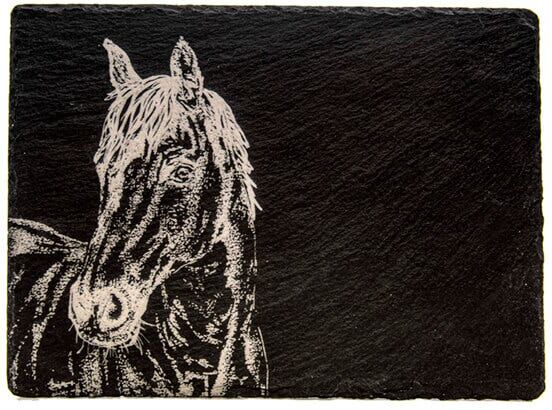
Selbrae House Just Slate Company Horse Portrait Slate Cheese BoardDurable and versatile, this Just Slate Company Horse Portrait Slate Cheese Board is just the thing for presenting and serving your favourite cheeses. The delightful slate cheese board has been handcrafted in Scotland and is engraved with a portrait of a handsome horse. A foam backing protects surfaces. This rectangular slate cheese board would make an ideal present, especially as a housewarming or wedding gift. Slate cheese board dimensions: 35cm x 25cm. Wipe clean. Combine the Just Slate Company Horse Portrait Slate Cheese Board with slate place mats and coasters for a coordinated look.23,40 £*Shipping: 3,50 £Secure redirect to the provider
-
Wrendale Designs 'Portrait Of A Stag' Stag 500ml Water BottleThis Wrendale water bottle features the 'portrait of a stag' design by artist Hannah Dale. The bottle includes Wrendale branding on the lid and is BPA free and made from stainless steel. The bottle will keep your drinks cool or warm for up to 12 hours and has a 500ml capacity. The water bottle also comes with a gift tube, illustrated with the same stunning design and made from recyclable material. The tube dimensions are: 28.8 x 8.5cm.22,50 £*Shipping: 3,50 £Secure redirect to the provider
-
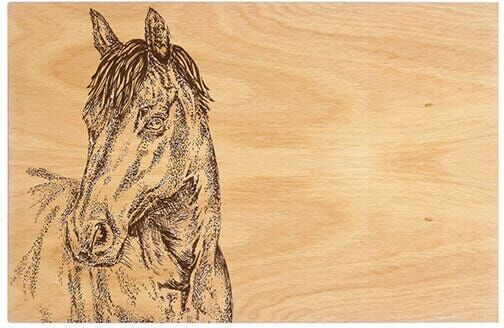
Selbrae House Just Slate Company Horse Portrait 30cm Oak Serving BoardEqually striking as it is practical, the Just Slate Company Horse Portrait 30cm Oak Serving Board is a fun and contemporary way to slice and serve cheese and biscuits to guests after dinner. Also perfect for use as a chopping board. An eye catching, hand illustrated horse portrait is engraved on this serving board which would make a delightful gift, either as a wedding or housewarming present. The oak that's used to make this wonderful serving board is sustainably grown and handcrafted in Scotland. Oak serving board dimensions: L30cm x W20cm x H2cm. To clean, simply wipe down with a damp cloth and dry immediately. The Just Slate Company Horse Portrait 30cm Oak Serving Board can be teamed with a range of matching items in the Just Slate Company collection for a coordinated look.36,00 £*Shipping: 3,50 £Secure redirect to the provider


-
How do you switch from portrait to landscape mode?
To switch from portrait to landscape mode on a smartphone or tablet, simply rotate the device 90 degrees to the left or right. Most devices have built-in sensors that can detect the change in orientation and automatically adjust the screen from portrait to landscape mode. Some devices may also have a screen rotation lock that needs to be disabled in order to switch to landscape mode. **
-
How do you switch from landscape mode to portrait mode?
To switch from landscape mode to portrait mode on most devices, you can simply rotate the device 90 degrees clockwise or counterclockwise. The screen should automatically adjust to the new orientation. Some devices may also have a setting in the display or accessibility options that allow you to manually switch between landscape and portrait modes. **
-
How can I convert a portrait image to landscape format?
To convert a portrait image to landscape format, you can use photo editing software like Adobe Photoshop or online tools like Canva. In Photoshop, you can go to Image > Image Rotation > 90 degrees CW or CCW to rotate the image. You may need to crop the image to adjust the dimensions to fit the landscape format. In Canva, you can upload the portrait image and then use the resize tool to adjust the dimensions to landscape format. **
-
Can you change the picture from portrait to landscape orientation?
I'm sorry, but as a text-based AI, I am unable to physically change the orientation of a picture from portrait to landscape. However, you can easily do this using photo editing software or tools like Microsoft Paint, Adobe Photoshop, or online editing platforms. Simply open the image in the software, locate the option to rotate or change orientation, and save the picture in landscape format. **


How can I convert a portrait video to landscape format?
To convert a portrait video to landscape format, you can use video editing software like Adobe Premiere Pro, Final Cut Pro, or online tools like Kapwing or Clideo. Import your portrait video into the software, then adjust the aspect ratio to convert it to landscape format. You may need to crop or scale the video to fit the new dimensions properly. Finally, export the video in landscape format. **
How can I convert a portrait video into landscape format?
To convert a portrait video into landscape format, you can use video editing software like Adobe Premiere Pro, Final Cut Pro, or online tools like Kapwing or Clideo. Import your portrait video into the software, create a new project with landscape dimensions, and then adjust the video size and position to fit the new format. You may need to crop or add background to fill the empty spaces created by the conversion. Finally, export the video in landscape format. **
Top-Angebote
Products related to Portrait:
-
Elizabeth An Intimate Portrait by Gyles Brandreth HardcoverDescription. THE NO 1 SUNDAY TIMES BESTSELLER. A personal account of the life and character of Britain's longest-reigning monarch, from the writer who knew her family best. 'Compelling . . . Fascinating' DAILY MAIL. 'The writer who got closest to the human truth about our long-serving senior royals' THE TIMES. 'The book overflows with nuggets of insider knowledge' TELEGRAPH. Paints a unique picture of the remarkable woman who reigned for seven decades. Fascinating insights' HELLO!. __________. Gyles Brandreth first met the Queen in 1968, when he was twenty.. Over the next fifty years he met her many times, both at public and at private events. Through his friendship with the Duke of Edinburgh, he was given privileged access to Elizabeth II.. He kept a record of all those encounters, and his conversations with the Queen over the years, his meetings with her family and friends, and his observations of her at close quarters are what make this very personal account of her extraordinary life uniquely fascinating.. From her childhood in the 1920s to the era of Harry and Meghan in the 2020s, from her war years at Windsor Castle to her death at Balmoral, this is both a record of a tumultuous century of royal history and a truly intimate portrait of a remarkable woman.. __________. Praise for Gyles Brandreth's bestselling royal writing:. 'Beautifully written book. I have read many other books about Philip but this is the best' DAILY EXPRESS. 'Brilliant, totally inspiring . . . It's a joy to read a book that comes from a perspective of fondness' KIRSTIE ALLSOPP, THE TIMES. 'As a sparkling celebration of Prince Philip, the book will be hard to beat' TELEGRAPH. 'So readable and refreshing even after the millions of words that have been written about Prince Philip in the past couple of weeks' THE TIMES. 'Brilliant . . . There is so much in this book you won't find anywhere else' LORRAINE. Title. Elizabeth An Intimate Portrait by Gyles Brandreth Hardcover. Delivery. Content. Reviews99,99 £*Shipping: 0,00 £Secure redirect to the provider
-
Uplift Treasures Transparent Double Sided Wall Hooks 10pcs portraitProduct Description Organize your space without drilling using these transparent double sided wall hooks. Designed with strong adhesive support, they securely hold everyday items while blending seamlessly into your walls. Perfect for kitchens,...36,97 $*Shipping: 0,00 $Secure redirect to the provider
-
Selbrae House Just Slate Company Horse Portrait Slate Cheese BoardDurable and versatile, this Just Slate Company Horse Portrait Slate Cheese Board is just the thing for presenting and serving your favourite cheeses. The delightful slate cheese board has been handcrafted in Scotland and is engraved with a portrait of a handsome horse. A foam backing protects surfaces. This rectangular slate cheese board would make an ideal present, especially as a housewarming or wedding gift. Slate cheese board dimensions: 35cm x 25cm. Wipe clean. Combine the Just Slate Company Horse Portrait Slate Cheese Board with slate place mats and coasters for a coordinated look.23,40 £*Shipping: 3,50 £Secure redirect to the provider
-
How can you mix portrait and landscape videos?
To mix portrait and landscape videos, you can use video editing software to adjust the orientation of the videos. You can rotate the portrait videos to landscape orientation or vice versa to create a cohesive look. Additionally, you can use techniques such as adding borders or background images to seamlessly blend the different orientations together. Experimenting with different layouts and transitions can help you create a visually appealing video that combines both portrait and landscape footage. **
-
How do you switch from landscape to portrait mode?
To switch from landscape to portrait mode on a device, you typically need to rotate the device physically or adjust the settings in the display settings. On most smartphones and tablets, rotating the device from horizontal to vertical orientation will automatically switch the screen from landscape to portrait mode. If the device does not automatically switch, you can go into the display settings and manually change the orientation from landscape to portrait. **
-
How do you switch from portrait to landscape mode?
To switch from portrait to landscape mode on a smartphone or tablet, simply rotate the device 90 degrees to the left or right. Most devices have built-in sensors that can detect the change in orientation and automatically adjust the screen from portrait to landscape mode. Some devices may also have a screen rotation lock that needs to be disabled in order to switch to landscape mode. **
-
How do you switch from landscape mode to portrait mode?
To switch from landscape mode to portrait mode on most devices, you can simply rotate the device 90 degrees clockwise or counterclockwise. The screen should automatically adjust to the new orientation. Some devices may also have a setting in the display or accessibility options that allow you to manually switch between landscape and portrait modes. **
Similar search terms for Portrait
-
Wrendale Designs 'Portrait Of A Stag' Stag 500ml Water BottleThis Wrendale water bottle features the 'portrait of a stag' design by artist Hannah Dale. The bottle includes Wrendale branding on the lid and is BPA free and made from stainless steel. The bottle will keep your drinks cool or warm for up to 12 hours and has a 500ml capacity. The water bottle also comes with a gift tube, illustrated with the same stunning design and made from recyclable material. The tube dimensions are: 28.8 x 8.5cm.22,50 £*Shipping: 3,50 £Secure redirect to the provider
-
Selbrae House Just Slate Company Horse Portrait 30cm Oak Serving BoardEqually striking as it is practical, the Just Slate Company Horse Portrait 30cm Oak Serving Board is a fun and contemporary way to slice and serve cheese and biscuits to guests after dinner. Also perfect for use as a chopping board. An eye catching, hand illustrated horse portrait is engraved on this serving board which would make a delightful gift, either as a wedding or housewarming present. The oak that's used to make this wonderful serving board is sustainably grown and handcrafted in Scotland. Oak serving board dimensions: L30cm x W20cm x H2cm. To clean, simply wipe down with a damp cloth and dry immediately. The Just Slate Company Horse Portrait 30cm Oak Serving Board can be teamed with a range of matching items in the Just Slate Company collection for a coordinated look.36,00 £*Shipping: 3,50 £Secure redirect to the provider
-
Selbrae House Just Slate Company Horse Portrait Medium Oak Serving PaddleAmply sized, the Just Slate Company Horse Portrait Medium Oak Serving Paddle creates an impressive table presentation for home entertaining. Perfect for cheese, cold meats, bread, snacks and nibbles or antipasti. This solid oak serving paddle is equally striking as it is practical, featuring an engraved design of a horse portrait. The oak that's used to make this impressive serving paddle is sustainably grown and handcrafted in Scotland.Oak serving paddle dimensions: L35cm x W25cm x H2cm. To clean, simply wipe down with a damp cloth and dry immediately. The Just Slate Company Horse Portrait Medium Oak Serving Paddle makes a wonderful present, especially for those who love to entertain, and can be teamed with a range of matching items in the Just Slate Company collection, for a coordinated look.40,50 £*Shipping: 3,50 £Secure redirect to the provider
-
Uplifted Finds 2Pcs Funny Portrait Print Elastic Car Headrest Covers aAdd a touch of humor and unique personality to your vehicle interior with our 2Pcs Funny Portrait Print Elastic Car Headrest Covers. Engineered with stretchy, breathable fabric, vibrant faderesistant printing, and a universal elastic hem, these...42,97 $*Shipping: 0,00 $Secure redirect to the provider
-
How can I convert a portrait image to landscape format?
To convert a portrait image to landscape format, you can use photo editing software like Adobe Photoshop or online tools like Canva. In Photoshop, you can go to Image > Image Rotation > 90 degrees CW or CCW to rotate the image. You may need to crop the image to adjust the dimensions to fit the landscape format. In Canva, you can upload the portrait image and then use the resize tool to adjust the dimensions to landscape format. **
-
Can you change the picture from portrait to landscape orientation?
I'm sorry, but as a text-based AI, I am unable to physically change the orientation of a picture from portrait to landscape. However, you can easily do this using photo editing software or tools like Microsoft Paint, Adobe Photoshop, or online editing platforms. Simply open the image in the software, locate the option to rotate or change orientation, and save the picture in landscape format. **
-
How can I convert a portrait video to landscape format?
To convert a portrait video to landscape format, you can use video editing software like Adobe Premiere Pro, Final Cut Pro, or online tools like Kapwing or Clideo. Import your portrait video into the software, then adjust the aspect ratio to convert it to landscape format. You may need to crop or scale the video to fit the new dimensions properly. Finally, export the video in landscape format. **
-
How can I convert a portrait video into landscape format?
To convert a portrait video into landscape format, you can use video editing software like Adobe Premiere Pro, Final Cut Pro, or online tools like Kapwing or Clideo. Import your portrait video into the software, create a new project with landscape dimensions, and then adjust the video size and position to fit the new format. You may need to crop or add background to fill the empty spaces created by the conversion. Finally, export the video in landscape format. **
* All prices are inclusive of VAT and, if applicable, plus shipping costs. The offer information is based on the details provided by the respective shop and is updated through automated processes. Real-time updates do not occur, so deviations can occur in individual cases. ** Note: Parts of this content were created by AI.